What does your Pi balance represent in dollars if the answer changes with the rate you choose? A Pi price calculator converts a balance into fiat, but the result depends on its valuation basis. A market-based estimate, a community value, and a custom rate can produce very different figures.
You may want a clear estimate in your local currency, whether that’s USD, EUR, GBP, NGN, or KES. The key is understanding what the number represents: a conversion estimate is not a guaranteed sale price or payout, and an in-app balance may not be the same as Pi that has been migrated to Mainnet and can be traded.
This guide explains how to calculate a Pi balance in a chosen fiat currency, compare Market Value, GCV, and custom value modes, and interpret the result. Pi Converter supports more than 100 currencies. Its Market Value is aggregated from major exchanges and updated hourly. You’ll also see why the valuation basis matters as much as the balance you enter.
Key Takeaways
- Enter your balance, select a valuation mode, and choose a fiat currency to use a Pi price calculator.
- Check the rate basis before interpreting or sharing a conversion. Different modes can produce different estimates for the same Pi amount.
- Choose a currency that fits your comparison, then compare estimates using consistent inputs.
- Treat the result as a reference calculation, not proof of a completed transaction or a guaranteed sale value.
- Keep an estimated balance separate from money you can withdraw.
What a Pi Price Calculator Shows, and What Its Estimate Means
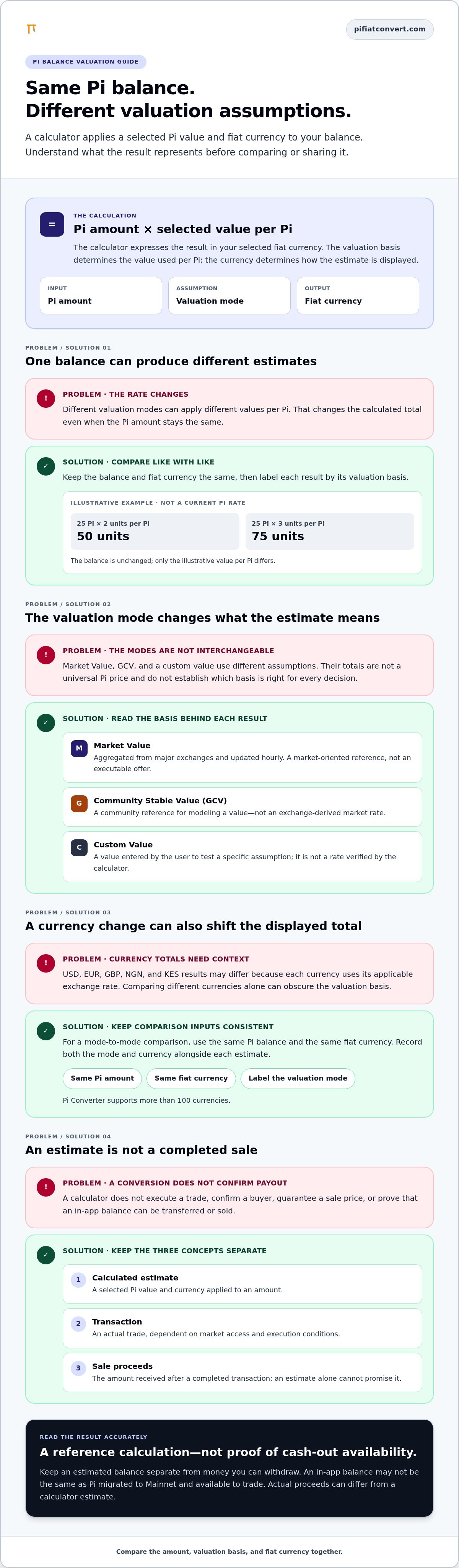
A Pi price calculator estimates the fiat value of a Pi amount using a selected Pi rate and currency. It performs a calculation, not a transaction. The displayed figure doesn’t confirm that Pi can be sold for that amount or that a buyer, market, or payout route is available.
A Pi price calculator multiplies a Pi balance by a chosen fiat value per Pi to show an indicative amount in a selected currency. The result depends on your inputs and valuation basis, so two calculators, or two modes in the same calculator, can show different totals for the same balance. Cryptocurrency values can reflect different assumptions and market conditions. For foundational context, see What is Cryptocurrency?
What does a Pi price calculator calculate?
The basic calculation is Pi amount multiplied by the selected Pi value in fiat. The amount is the number of Pi entered; the valuation basis determines the value used per Pi; and the selected fiat currency determines how the result is expressed. When converting between currencies, the applicable fiat exchange rate also affects the displayed total.
Hypothetical example: If you enter 25 Pi and choose an illustrative rate of 2 currency units per Pi, the estimate is 50 currency units. This is an example only, not a current Pi rate. At an illustrative value of 3 currency units per Pi, the same 25 Pi produces an estimate of 75 units. The balance hasn’t changed; only the selected valuation has.
This distinction matters when you compare an exchange-aggregated Market Value with GCV or a custom value. The calculator applies the selected basis to the amount; it doesn’t determine which basis is appropriate for a particular decision. Read the mode and currency alongside the total, rather than treating the number as a universal Pi price.
Does a conversion estimate mean you can sell Pi for that amount?
No. A conversion tool calculates a value for comparison or planning; it doesn’t execute trades or exchange Pi. An estimate is informational. An actual sale depends on separate factors, including access to a market where Pi can be traded and sufficient liquidity for the transaction.
Even a market-based estimate isn’t a quoted offer for your balance. Market prices can move, and the amount realized in a transaction may differ from a calculator’s figure. The estimate also doesn’t establish that an in-app balance is transferable or available to sell. Keep these categories distinct:
- Calculated estimate: the result of applying a selected Pi value and currency to an amount.
- Transaction: an actual trade, subject to market access and execution conditions.
- Sale proceeds: the amount received after a completed transaction. An estimate alone cannot promise this amount.
Use the result to understand how a selected assumption translates into fiat, not as confirmation of cash-out availability, guaranteed proceeds, or future value.
GCV, Market Value, and Custom Value: How the Calculator Gets a Result
A Pi price calculator can apply different valuation bases to the same Pi amount. Pi Converter offers three modes: Market Value, community Stable Value (GCV), and a custom Pi value. Each mode answers a different kind of question, so your choice matters as much as the balance entered.
The selected valuation basis shapes the estimate, not the Pi balance. Market Value is aggregated from major exchanges and updated hourly. GCV is a community Stable Value reference, not an exchange-derived market rate. Custom Value uses a value entered by the user. These modes are calculation inputs, not guarantees of a sale price.
When should you use Market Value, GCV, or a custom Pi value?
Choose the mode that matches the question you’re exploring:
- Market Value: Use it to estimate a balance based on the tool’s aggregated exchange data. It provides a market-oriented reference, but the result remains an estimate rather than an executable offer.
- GCV: Use it to model what a balance would represent against the community Stable Value reference. Treat the result as a scenario based on that reference, not as evidence of a market-traded rate.
- Custom value: Enter your own Pi value to test a specific assumption. This is useful for scenario comparisons, but the input is yours and isn’t a rate verified by the calculator.
No mode is automatically right for every purpose. Market Value and GCV describe different valuation assumptions. Comparing them can clarify how the figures differ, but it doesn’t determine which one should guide a transaction. Focus on how each value is formed and what it represents.
Why can two Pi calculator results differ?
The first reason is the Pi value selected. If one calculation uses Market Value and another uses GCV or a custom input, the calculation starts from a different value per Pi. The estimated totals can therefore diverge even when the balance is identical. That difference reflects the assumptions, not a change in the amount of Pi.
The second reason is the fiat currency. A result in USD won’t necessarily match one in EUR, GBP, NGN, or KES because each currency uses its applicable exchange rate. For a clear comparison, note both the valuation mode and output currency instead of comparing totals without context.
To compare modes, calculate the same balance in the same fiat currency, then label each result by its basis. Compare Pi valuation modes in Pi Converter to see how the selected assumptions affect your estimate.
Choose a Pi Calculator Currency and Compare Estimates Carefully
The fiat currency you select determines how the estimated value is displayed. Pi Converter supports USD, EUR, GBP, NGN, KES, and more than 100 other currencies, so you can view an estimate in a currency relevant to your comparison or planning. The selection doesn’t change the Pi amount entered; it changes the currency used to express its estimated value.
Which fiat currencies can you use for a Pi conversion?
A broad currency range is useful when comparing figures across different local contexts instead of defaulting to USD. For example, someone organizing a personal budget in Kenya may prefer KES, while a comparison for a UK-based expense may be easier to read in GBP. Choose the currency that makes the estimate meaningful for your purpose.
These examples describe comparison contexts, not payment options. Converting a figure into local currency doesn’t provide access to a bank account, payment service, or market where Pi can be sold.
| Currency code | Currency name | Example use case |
|---|
| USD | US dollar | Comparing an estimate in a commonly used reference currency |
| EUR | Euro | Reviewing a value in euros for euro-denominated planning |
| GBP | British pound | Considering an estimate alongside expenses set in pounds |
| NGN | Nigerian naira | Viewing a calculation in naira for a Nigeria-based comparison |
| KES | Kenyan shilling | Viewing a calculation in shillings for a Kenya-based comparison |
How should you compare estimates across currencies?
For a useful comparison, hold the Pi amount and valuation mode constant, then change only the fiat currency. If you change the amount or rate basis at the same time, it’s harder to tell which input caused the totals to differ. Label each result with both its currency and valuation basis.
For example, compare the same balance and Market Value basis in USD, EUR, and NGN. The totals will differ because each is expressed using its respective fiat conversion rate. That doesn’t mean the calculator changed your Pi balance. It reflects the selected currency and the exchange rate used in the conversion.
A Pi price calculator is most useful for local-currency comparisons when the inputs are clear and consistent. Before sharing a result, include the Pi amount, valuation mode, currency code, and time of calculation, especially if you may revisit it later. This context helps others interpret the figure without mistaking a currency conversion for a trade or payment amount.
How to Use a Pi Price Calculator to Value Your Balance
To estimate a Pi balance, enter the amount, select a valuation mode, choose a fiat currency, and read the result. Each selection defines what the calculator applies to your input. For a consistent example, use a hypothetical balance of 40 Pi. Enter the amount manually; the calculator doesn’t need to read a wallet balance to produce an estimate.
Enter your Pi amount, choose a valuation basis, select a fiat currency, then interpret the estimate in the context of those choices. Before relying on or sharing the figure, make sure you can identify the selected basis and output currency.
Enter your Pi amount and choose a valuation basis
Start by typing 40 Pi into the amount field. Next, choose the basis that fits your purpose: Market Value uses the tool’s aggregated exchange data; GCV models the amount against the community Stable Value reference; and custom value applies a Pi value you enter. The 40 Pi stays the same in each case. Only the assumption changes.
- Enter the amount. Use the balance you want to model, such as the hypothetical 40 Pi. Check the digits before continuing, since an extra or missing digit changes the calculation.
- Select the valuation mode. Choose Market Value for an estimate based on aggregated exchange data, GCV to model against its community reference, or custom value to test a value you supply.
- Choose your fiat currency. Select the currency you want the estimate expressed in, such as USD, EUR, GBP, NGN, or KES.
- Read the result with its labels. Note the entered amount, selected mode, and currency together. If you can’t identify the rate basis, the total isn’t self-explanatory.
Select a fiat currency and interpret the displayed estimate
Choose the target currency before assessing the converted total. Pi Converter supports more than 100 currencies, and its Market Value is aggregated from major exchanges and updated hourly. Fiat conversion uses current exchange rates, so the output can reflect changes in the selected Pi value or fiat conversion rates. For comparisons, keep the Pi amount and mode constant, and change only the currency you want to examine.
After the result appears, confirm its labels. A figure in NGN based on GCV is a different comparison from a figure in EUR based on Market Value, even if both use the same 40 Pi. Recording the inputs alongside the result makes it easier to reproduce or explain the estimate later.
The displayed amount is a calculation, not a trade confirmation or payout quote. It doesn’t establish that a balance can be transferred, that a sale can be executed, or that proceeds will match the estimate. Use Pi Converter to calculate your balance in fiat with the amount, mode, and currency that suit your comparison.
Use Pi Converter for a Clearer Estimate, not a Transaction
Pi Converter is a free online tool for estimating what a Pi amount represents in fiat currency. It makes the assumptions visible: you can view a balance using exchange-aggregated Market Value, the community Stable Value (GCV), or a custom Pi value. The result helps you compare scenarios, but it doesn’t execute a trade or establish what you could receive in a sale.
What Pi Converter offers for balance estimates
Market Value is aggregated from major exchanges and updated hourly. GCV lets you model a balance against the community Stable Value reference, while custom value lets you calculate using an input of your own. These modes provide different reference points. They aren’t interchangeable rates or confirmation that a result can be realized.
You can express an estimate in USD, EUR, GBP, NGN, KES, and more than 100 other currencies. This helps you compare a balance in a fiat currency relevant to your planning, whether you’re reviewing a figure in euros or considering a local-currency estimate in naira or shillings. The selected currency changes how the result is displayed, not the Pi amount behind it.
For a useful record, note the amount entered, selected mode, currency, and time you viewed the result. This context matters when comparing estimates later because Market Value and fiat exchange rates can change. A bare total without its valuation basis is difficult to interpret accurately.
Pi Converter provides estimates only. It isn’t an exchange or brokerage, and it doesn’t provide a Pi Network wallet or custody service. It doesn’t transfer, hold, or sell Pi. A displayed conversion isn’t a trade confirmation, payout quote, or guarantee of cash-out value. Whether a Pi balance can be accessed or sold depends on factors outside a calculator’s conversion function.
Calculate a Pi balance with the valuation basis you intend to use
Choose a mode that fits the scenario you want to examine. Use Market Value for an estimate based on aggregated exchange data, GCV to model against the community reference, or a custom Pi value to test your own assumption. When saving or sharing a result, label the mode and currency so others can see what the figure represents.
Use the free Pi price calculator to compare your balance in a chosen fiat currency, while keeping the estimate separate from any decision or transaction. Use the free Pi price calculator.
Make Your Next Pi Valuation More Useful
Before calculating, decide what you want the figure to help you understand. Are you comparing a balance with a personal budget, reviewing a value in your local currency, or testing how a different assumption changes the result? A clear question makes the output easier to use and keeps an estimate in its proper role.
A Pi price calculator is most useful when you treat each result as a snapshot tied to its inputs. If you revisit the calculation later, record the amount, currency, and valuation basis so you can make a meaningful comparison instead of relying on a number without context. This simple habit makes estimates more informative without turning them into predictions or promises.
Use Pi Converter to explore the scenario that matters to you, then interpret the result according to the basis you selected. The tool supports clearer comparisons, while any decision about a transaction remains separate. Use the free Pi price calculator and keep the assumptions in view.
Frequently Asked Questions
Is a Pi price calculator showing the official value of Pi?
No. A Pi price calculator displays an estimate based on its selected valuation mode, not a single official value for every purpose. Market Value reflects exchange-aggregated data, GCV is a community reference, and custom value is a user-entered assumption. When assessing a figure, identify its source and intended meaning rather than describing every calculator result as an official Pi price.
Can I use a Pi calculator to convert a fractional Pi amount?
Yes. Enter a fractional amount as a decimal, such as 0.5 Pi or 1.25 Pi. The calculation applies the selected value per Pi to the amount entered, so a fraction produces a proportional estimate. Check the decimal digits before calculating, especially when copying a balance, since a misplaced digit can materially change the displayed result.
Does Pi Converter let me enter a custom Pi value?
Yes. Select custom Pi value mode and enter the value you want to use for your scenario. For example, compare how the same balance appears under two different assumptions without changing the number of Pi entered. Label the custom input as your chosen assumption. It isn’t an independently verified price or an offer to buy your Pi.
How often is Pi Converter’s Market Value updated?
Pi Converter’s Market Value is updated hourly and aggregated from major exchanges. It’s a reference from the latest update, not a continuously guaranteed quote for a transaction. If you’re recording an estimate for later comparison, note when you viewed it. A result captured at one time may differ from a later calculation as market data changes.
Can I convert Pi to Nigerian naira or Kenyan shillings?
Yes. Pi Converter supports NGN for Nigerian naira and KES for Kenyan shillings, alongside other fiat currencies. Select the currency that makes your comparison easier to understand, then record its code with the result to avoid mixing figures in different currencies. A calculated NGN or KES value is a currency estimate; it doesn’t provide local banking or payment access.
Does converting Pi in a calculator sell or transfer my Pi?
No. Entering an amount in a calculator only produces a conversion estimate. It doesn’t connect to or read your wallet, transfer Pi, place an order, or complete a sale. Keep the calculated figure distinct from any separate wallet activity or transaction confirmation. The conversion result alone can’t establish that Pi has moved or that proceeds have been received.
Is Pi Converter free to use?
Yes. Pi Converter is a free online tool for estimating Pi values in fiat currencies. Use it to explore a conversion without treating the result as a purchase or sale service. The estimate still depends on the selected mode, currency, and rates used in the calculation, so read those details alongside the amount rather than assuming the displayed total is a guaranteed payout.