The same Pi balance can produce different fiat estimates depending on the rate you choose. To calculate Pi value in fiat, multiply your Pi amount by a rate expressed in your selected currency. The arithmetic is simple; interpreting the rate takes more care, because Pi Network does not set one fixed price for Pi.
If you’ve seen different conversion figures or wondered whether a calculator’s estimate is what you could actually receive, that distinction matters. This guide explains how to choose a rate, calculate a Pi amount in local currency, and understand what the result represents without treating it as a transaction quote.
You’ll see how Market Value, community Stable Value (GCV), and a custom Pi value affect the calculation, then learn why exchange prices, fees, and execution conditions can make actual proceeds differ from an estimate. Pi Converter supports these modes and more than 100 fiat currencies, including USD, EUR, GBP, NGN, and KES. Its Market Value is aggregated from major exchanges and updated hourly. Use it as a valuation reference, not as an exchange or brokerage transaction.
Key Takeaways
- To calculate Pi value in fiat, multiply the Pi amount by the selected fiat value per Pi.
- Choose a rate mode that suits your purpose: GCV, Market Value, and a custom value use different inputs.
- To use a converter, enter your Pi amount, choose a fiat currency and rate mode, then review the result.
- Read the displayed figure as a valuation estimate, not a guaranteed amount you’ll receive from a transaction.
- In this guide, Pi refers to the Pi Network cryptocurrency, not the mathematical constant.
What Does It Mean to Calculate Pi Value in Fiat?
To calculate Pi value in fiat, express a specified amount of Pi Network cryptocurrency in a government-issued currency by multiplying the Pi amount by a selected Pi-to-fiat rate. Fiat currencies include familiar units such as the US dollar (USD) and euro (EUR). The calculation answers a specific question: what does this amount equal using this rate, in this currency, at this point in time?
Here, “Pi” means the cryptocurrency associated with Pi Network, not mathematical pi, the constant used in geometry. The distinction matters because a crypto conversion depends on a chosen rate and currency, while mathematical pi is not a tradable asset.
What is a Pi-to-fiat conversion?
A Pi-to-fiat conversion translates a Pi balance into a selected currency using a rate stated as fiat value per Pi. For example, suppose a hypothetical rate is €2 per Pi. At that illustrative rate, 10 Pi × €2 per Pi = €20. This example explains the arithmetic only; it is not a current Pi price or a promise that 10 Pi can be sold for €20.
What does a calculator result represent?
A calculator applies the inputs you provide or select and returns an arithmetic estimate. It doesn’t complete a sale, transfer funds, or confirm that a buyer will accept Pi at that rate. The result can help you compare values, but it isn’t evidence of fiat proceeds from a completed transaction.
The estimate changes when the rate input changes. A community Stable Value (GCV), a Market Value, or a custom Pi value may produce different results for the same Pi amount and currency. These modes reflect different rate assumptions, so check which one is being used before interpreting or comparing figures.
Three details shape what the estimate means:
- Rate: The selected Pi-to-fiat value sets the basis for the conversion.
- Currency: The result is expressed in the currency you choose, such as USD or EUR.
- Calculation time: A rate can change, so a result generated now may differ from one calculated later.
Actual proceeds depend on transaction conditions, including the rate available when the transaction is executed and any applicable trading or withdrawal costs. A calculator result doesn’t establish liquidity, guarantee market acceptance, or account for every transaction condition. Treat it as a snapshot based on stated inputs, not a quote or assured payout. This distinction lets you use the estimate for what it can show: how a chosen Pi rate translates into fiat. Execution and final proceeds are separate matters.
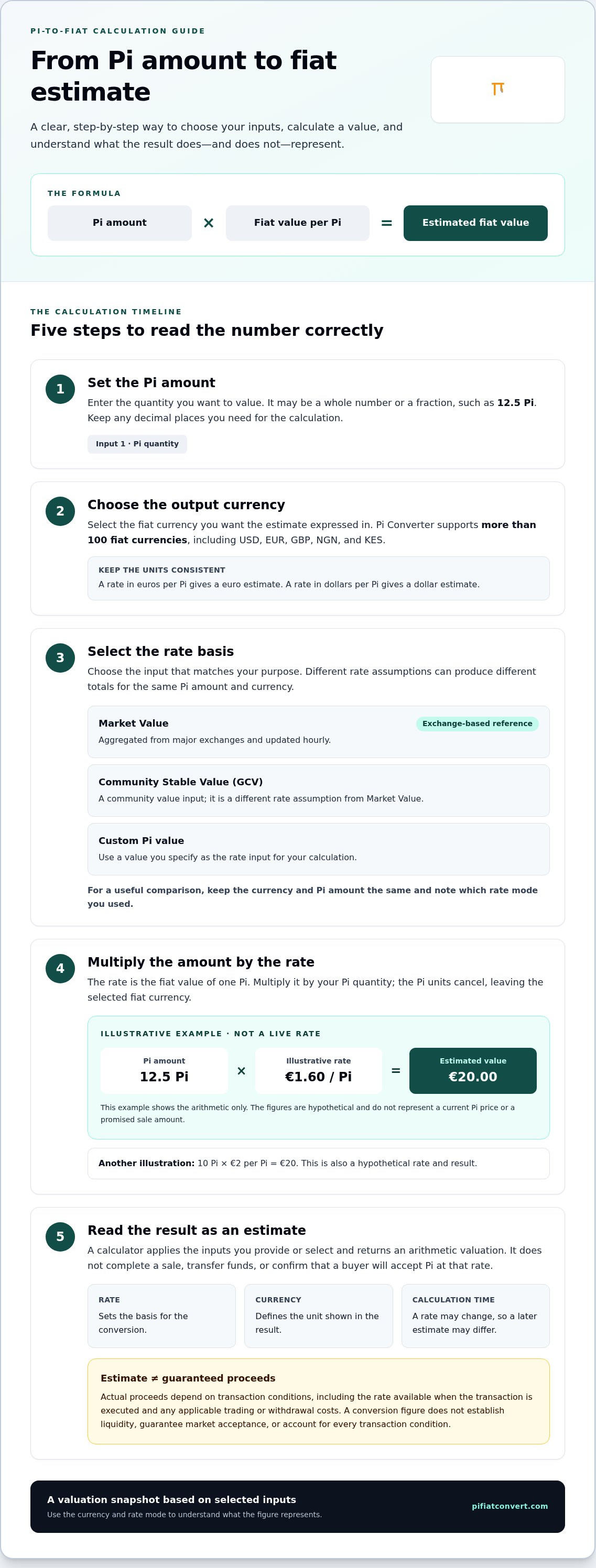
Once you’ve chosen a rate, the arithmetic is straightforward: Pi amount × fiat value per Pi = estimated fiat value. The first input is the quantity of Pi you want to value. The second is the rate for one Pi, stated in a specific fiat currency. Their product is an estimate in that same currency.
Before calculating, identify each part:
- Pi amount: The number of Pi being valued. It can be a whole number or a fraction, such as 12.5 Pi.
- Fiat value per Pi: The selected rate for one Pi, with its currency stated clearly, such as euros per Pi or US dollars per Pi.
- Estimated fiat value: The multiplication result, expressed in the currency used for the rate.
The rate’s denomination determines the output. For an estimate in euros, use a rate expressed in euros per Pi. A rate in dollars per Pi produces a dollar estimate. Don’t pair a rate in one currency with an expected result in another without also converting between those currencies.
Identify the Pi amount and rate
Write down the Pi quantity, including any decimal places. Then record the rate and its source, keeping the same valuation mode throughout the calculation. Using consistent inputs makes it easier to compare estimates and spot when a difference comes from a changed rate assumption.
The Pi Network Official Whitepaper provides background on the network’s design, but a calculation still depends on the rate you select. The whitepaper doesn’t replace the need to identify the currency and rate basis used for a particular estimate.
Apply the formula without mixing units
Consider this hypothetical example: the amount is 12.5 Pi, and the illustrative rate is €1.60 per Pi. Neither figure represents a live rate or current valuation. Multiply the amount by the rate:
12.5 Pi × €1.60 per Pi = €20.00
The Pi units cancel out, leaving euros as the result. If you instead used a hypothetical rate of $1.60 per Pi, the same amount would produce an estimate of $20.00, not €20.00. Always include the currency label when recording or sharing a result; the number alone is incomplete.
Rounding affects how the answer is displayed, not the inputs or underlying arithmetic. A calculator might show two decimal places for a fiat amount. Keep more precision during the calculation if needed, then round the displayed estimate to a sensible number of decimal places. Rounding doesn’t make the estimate more certain or change the rate it uses.
To avoid manual multiplication, enter your amount and choose a currency and rate mode in the Pi-to-fiat converter. The result reflects those selected inputs, so note the mode and currency alongside the figure.
Choose the Pi Rate Before Converting to Fiat
The multiplication is only one part of a Pi-to-fiat estimate. First decide which rate to apply. The same Pi amount can produce different totals when calculated with different inputs. Choose a rate mode before comparing results or using them to assess a particular scenario.
Pi Converter offers three inputs: community Stable Value (GCV), Market Value, and a custom Pi value. They are alternative calculation modes, not interchangeable claims about what every holder can receive in a transaction. The right mode depends on what you want the estimate to show.
Understand the rate input you select
GCV uses the community Stable Value as its input. Its use in a calculator represents that valuation approach; it doesn’t mean the figure is universally accepted as a market price. Market Value is aggregated from major exchanges and updated hourly in Pi Converter, providing an exchange-based reference that can change over time. Custom Pi value lets you enter your own rate assumption to test a scenario without presenting that input as a live market quote.
Choose the mode that matches your question. Use a custom value to model a scenario, or Market Value when you want an exchange-aggregated reference. If you choose GCV, interpret the output as an estimate calculated with that community Stable Value input. In every case, keep the mode with your notes so the result has context.
Why two fiat estimates may differ
Consider a hypothetical calculation for 25 Pi in euros. At an illustrative rate of €0.50 per Pi, the estimate is €12.50. At an illustrative rate of €0.60 per Pi, it is €15. These figures are examples only, not current rates. The Pi quantity stayed the same; changing the rate changed the result.
Differences can reflect the valuation mode, the time a Market Value was last updated, or the fiat exchange rate used to express the value in your chosen currency. Even two tools displaying market-based estimates may use different update times or underlying rate inputs. For a meaningful comparison, match the Pi amount, currency, mode, and observation time.
Before you calculate Pi value in fiat, decide whether you need a community Stable Value, an exchange-aggregated Market Value, or a custom assumption. Record the mode and currency with the result. This makes the estimate easier to interpret later and helps distinguish a changed input from a changed Pi amount. The calculation remains a valuation reference, not confirmation of a completed trade or guaranteed proceeds.
How to Calculate Pi Value in Fiat With a Converter
A converter handles the multiplication, but the estimate still depends on your inputs. Follow these steps to calculate a Pi amount in a selected fiat currency, then check the rate mode and timing before interpreting the result. The same process works for a fractional balance or a larger amount.
Enter a Pi amount and choose a fiat currency
Start with the quantity you want to value. Enter the Pi amount, including decimal places if you’re working with a fraction. Then select the fiat currency for the result. Pi Converter supports more than 100 currencies, including USD, EUR, GBP, NGN, and KES.
Check the currency code before reading the estimate. Similar-looking amounts can mean different things in different currencies, so confirm that the result is in your intended currency, such as EUR rather than USD. You can enter the quantity you want to assess without rounding it to a whole number first.
Select a rate mode and read the estimate
Next, select the rate input that fits your purpose. Pi Converter provides community Stable Value (GCV), Market Value, and custom Pi value modes. GCV applies the community Stable Value input; Market Value uses data aggregated from major exchanges and is updated hourly; a custom value lets you test a rate assumption of your choosing. These modes can produce different outputs for the same amount and currency.
After choosing a mode, review the estimate and note the currency and input alongside it. For Market Value, record when the rate was updated if that information is displayed. The estimate may change as market data or the exchange rates used for fiat conversion change. Don’t compare two results as if they were equivalent unless their currencies, rate modes, and observation times match.
Use the result as a valuation reference. A calculator translates the amount and rate you selected; it doesn’t execute a trade or guarantee that the displayed figure will be available as proceeds. Transaction conditions can affect what someone ultimately receives, so keep the estimate distinct from a completed exchange.
- Enter the Pi quantity you want to value.
- Choose the target fiat currency and check its code.
- Select GCV, Market Value, or a custom Pi value.
- Read the estimate and note its rate mode and timing.
These steps can be applied in Pi Converter’s Pi-to-fiat calculator. The online tool shows your selected amount and currency under different rate inputs, making it easier to compare estimates while keeping their basis clear.
How to Interpret a Pi-to-Fiat Calculation
A converter translates your Pi amount and selected rate inputs into a fiat estimate. It doesn’t exchange Pi, find a buyer, or deliver funds. Read the displayed figure as an arithmetic result under stated assumptions, not as confirmation of what you would receive in a transaction.
This distinction is practical. A calculated value can help you compare scenarios or understand a balance, but a completed transaction depends on separate conditions, including the rate available when it takes place. Keep estimates and realized proceeds separate in your records.
What can change the displayed fiat estimate?
Three inputs shape the result: the Pi amount, the selected rate mode, and the fiat currency. Change any one and the output can change. For example, holding the amount constant while switching from GCV to Market Value changes the rate used; choosing EUR instead of USD changes the currency in which the result is expressed.
Timing matters too. Pi Converter’s Market Value is aggregated from major exchanges and updated hourly, so a later calculation may use a different market input. Display rounding can also make the shown figure look slightly different from a result calculated with greater precision. Rounding changes the presentation, not the underlying rate or arithmetic.
For a useful comparison, record these details with each estimate:
- Pi amount: Include any fractional quantity.
- Currency: Note the selected code, such as USD or EUR.
- Rate mode: Record GCV, Market Value, or custom value.
- Calculation time: Note when you generated the estimate, especially for Market Value.
What a calculator cannot establish
A valuation estimate doesn’t confirm that a buyer is available, that a sale has occurred, or that a payment will be made. It also doesn’t establish that the displayed amount is withdrawable or guaranteed. The calculator applies selected inputs to provide a fiat valuation; transaction execution and its outcome are separate.
This is why a conversion figure shouldn’t be treated as a transaction quote. The final amount from a completed transaction may differ if the applicable rate or other transaction conditions differ from the assumptions used in the calculation. The estimate is still useful when its limits are clear.
Use the result to understand what your selected Pi amount represents under a particular rate, currency, and calculation time. When comparing estimates, align those inputs first. Otherwise, the difference may reflect a change in assumptions rather than a meaningful change in value.
For a fresh estimate in your chosen currency, calculate Pi in your chosen fiat currency. Treat the result as a valuation reference, not a promise of transaction proceeds.
Make Your Next Pi Valuation Easier to Compare
A useful estimate can serve as a reference point when you revisit your Pi balance. Save the amount, currency, rate mode, and calculation time together. That record makes it easier to tell whether a later result changed because of the rate or because you used different inputs.
Use the figure as a starting point for understanding value, not as a decision on its own. When you calculate Pi value in fiat again, keep your comparison consistent and treat each new estimate as a snapshot rather than a promise of proceeds. Pi Converter is a free online tool for applying your chosen inputs without turning the calculation into a transaction.
Calculate a Pi-to-fiat estimate in your preferred currency, then save the details that give the result context. With a clear record, you can make future comparisons more useful and interpret each estimate with greater confidence.
Frequently Asked Questions
Can I calculate the fiat value of a fractional Pi amount?
Yes. Fractional Pi amounts use the same multiplication formula as whole balances: multiply the quantity by the selected fiat rate per Pi. For example, you can enter 0.25 Pi rather than rounding it up to 1 Pi. Keep the digits you need during the calculation, then check how many decimal places the converter displays. A rounded display may differ slightly from the more precise estimate.
Is a Pi-to-fiat calculator result the amount I will receive if I sell?
No. A calculator provides an estimate based on the amount, currency, and rate input; it doesn’t complete a sale or confirm payment. Proceeds depend on the terms and conditions of an actual transaction, which may differ from the calculator’s assumptions. Treat the displayed figure as a valuation reference, not a guaranteed payout, sale price, or confirmation that funds can be withdrawn.
Why do two Pi calculators show different fiat values?
They may use different rate inputs, valuation modes, or update times. Confirm that both results use the same Pi amount and fiat currency, then compare the rate basis and calculation time. Currency exchange rates can also affect the output, and calculators may round displayed values differently. A difference doesn’t necessarily mean either calculation is incorrect; the inputs may simply not match.
How often does Pi Converter update its Market Value?
Pi Converter updates its Market Value hourly. The figure is aggregated from major exchanges, so it provides an exchange-based reference rather than a fixed rate. A calculation made after an update may differ from an earlier one, even with the same Pi amount and fiat currency. For comparisons, note the calculation time as well as the selected rate mode.
Can I calculate Pi value in Nigerian naira or Kenyan shillings?
Yes. Pi Converter supports Nigerian naira (NGN), Kenyan shillings (KES), and more than 100 fiat currencies. Select the currency you want and check its code before interpreting the estimate. The output depends on the rate input and currency conversion used, so a result in NGN or KES is an estimate in that denomination.
What happens if I enter a custom Pi value?
A custom Pi value lets you model a calculation using a rate assumption you enter. The converter applies that input to your Pi amount and returns an estimate in the chosen currency. This can help you compare hypothetical scenarios, but it doesn’t establish that the custom rate is a market price, that a buyer will accept it, or that a transaction can be completed at that value.