A Pi-to-dollar figure can look precise without representing money you can actually receive. If you want to convert Pi to dollars, the result depends on the rate you select. A calculator estimate is not the same as selling Pi or receiving USD.
That distinction matters when market-based values differ from community valuations. A market rate reflects exchange data and can change. The community’s Global Consensus Value (GCV) is an unofficial valuation, not a market price. A custom rate lets you test an assumption, but it does not make that value tradable.
This guide explains how to calculate a Pi amount in USD, compare Market Value, GCV, and custom rate models, and interpret each result. A free conversion calculator can handle different Pi amounts without manual arithmetic. Pi Converter calculates conversions using these rate options. It is not an exchange, brokerage, or wallet, and a displayed estimate does not sell, transfer, or pay out your Pi.
Key Takeaways
- Use the formula Pi quantity × selected USD-per-Pi rate to estimate a dollar value.
- Compare Market Value, community GCV, and a custom input according to what each rate represents.
- When you convert Pi to dollars, treat the result as an estimate based on your selected rate, not proof of a sale.
- Check that the calculator is set to Pi-to-USD before using the displayed result.
- Use Pi Converter to model balances and rate scenarios, while keeping calculations separate from transactions.
Convert Pi to Dollars: What a USD Calculation Tells You
To convert Pi to dollars, multiply the amount of Pi by the selected USD value for one Pi. The result is an estimate based on that rate, not a statement of what a buyer will pay or what you will receive. The calculation answers a specific question: what does this quantity of Pi come to under the rate you selected?
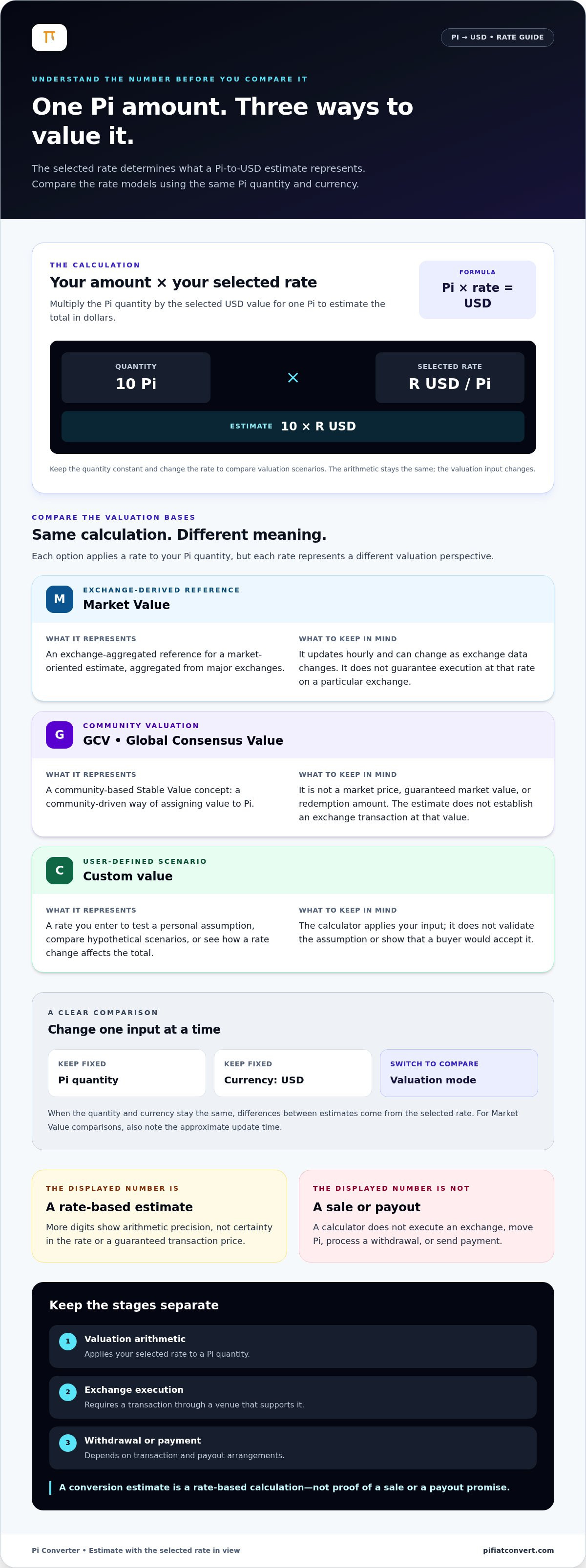
Pi quantity × selected USD-per-Pi rate = estimated USD value. Enter the number of Pi you want to calculate and the dollar value assigned to one Pi. Multiplying the two gives the estimated total in USD.
For a symbolic example, enter 10 Pi and let the selected rate be R dollars per Pi. The estimate is 10 × R USD. Keep the amount at 10 Pi and choose another rate, and the result changes. The arithmetic stays the same; the valuation input changes.
How the Pi-to-USD conversion formula works
A calculator applies the selected rate to the amount you enter. When the rate is stated as a dollar value for one Pi, multiplying it by the quantity scales that value to your balance. This makes it easy to compare amounts without repeating the calculation manually.
More digits in the answer show the precision of the arithmetic, not the certainty of the rate. They do not make the underlying rate fixed or guarantee that it matches a particular transaction. For broader context on digital assets and their market dynamics, see What is Cryptocurrency?
What a Pi dollar estimate does not mean
A conversion figure is separate from completing a transaction. The calculator does not execute an exchange, move Pi, process a withdrawal, or send a payment. Those actions depend on factors beyond multiplication, including market access, available liquidity, and transaction terms.
- Valuation arithmetic: Applies your selected rate to a Pi quantity.
- Exchange execution: Requires a transaction through a venue that supports it.
- Withdrawal or payment: Depends on the transaction and payout arrangements.
These are separate stages, not automatic results of entering an amount into a calculator. A displayed estimate does not confirm that a sale can be completed at the selected rate or that the calculated amount will be paid out.
A conversion estimate is a rate-based calculation, not a payout promise. Use it to model a value from a stated input, then assess any potential transaction separately. This keeps a useful USD estimate from being mistaken for money already received.
The rate you select determines what a Pi-to-USD estimate represents. Pi Converter offers three calculation bases: an exchange-aggregated Market Value, the community Stable Value known as GCV, and a custom Pi value you enter. Each can be applied to the same Pi quantity, but each answers a different valuation question.
- Market Value: An exchange-aggregated reference for a market-oriented estimate. It can change over time.
- GCV: A community-based Stable Value concept that reflects a different valuation perspective from exchange pricing.
- Custom value: A user-defined rate for testing a specific assumption or scenario.
The most useful basis depends on what you want to understand. To compare the options clearly, keep the Pi quantity and currency constant, then change only the valuation mode. Any difference between the estimates then comes from the selected rate, not a change in the amount of Pi.
When to use Market Value for a Pi-to-USD estimate
Choose Market Value when you want an exchange-based reference rather than a community valuation or personal assumption. Pi Converter aggregates Market Value from major exchanges and updates it hourly. The reference can change as exchange data changes, and it does not promise that a particular exchange will execute a transaction at exactly that rate.
Use this mode to frame an estimate around exchange-derived information. Rates can vary across venues and over time, so the calculator’s aggregate does not establish the price available for a specific transaction.
How GCV and custom Pi values change the calculation
GCV, or Global Consensus Value, is a community Stable Value concept. It represents a community-driven way of assigning value to Pi, not a guaranteed market price or redemption amount. Selecting it shows what your Pi quantity calculates to under that valuation model. It does not establish that the same value is available in an exchange transaction.
A custom value serves a different purpose. Enter one to test a personal assumption, compare hypothetical scenarios, or see how a change in the rate affects the total. The tool applies the number you provide, but that calculation does not validate the assumption or indicate that a buyer would accept it.
The selected valuation model describes the estimate, not a realizable sale price. Keep that distinction in mind if you convert Pi to dollars for planning or comparison. A rate can be useful as an input without being an executable offer.
To compare these bases using the same Pi amount, use the Pi-to-USD calculator and switch between Market Value, GCV, and a custom value. Treat each result as a separate scenario, with the chosen rate in view.
Read Your Pi-to-USD Result Without Misreading the Rate
A displayed USD total combines your Pi amount with the selected valuation basis and, where needed, current exchange rates used to express the result in dollars. Read the number alongside those inputs. When comparing estimates, check that they use the same rate model, currency, and approximate update time. Otherwise, a difference may come from the setup rather than a change in your Pi quantity.
Keep calculation data separate from market commentary. A chart may show historical price movement, while a conversion estimate applies a selected rate to an amount. Historical performance describes what happened over a period, but it does not necessarily determine the rate used for the current calculation.
Why Pi-to-USD results can differ between calculators
Different tools may use different rate sources, refresh data at different times, or apply different valuation methods. They may also round results differently. A market-based rate and a community valuation, for example, are not equivalent inputs, even when both are shown in USD.
For a fair comparison, align the Pi amount, rate basis, currency, and timing before comparing totals. A mismatch in any one of these can produce a different estimate because the calculators are not using the same inputs.
How to interpret a changing USD estimate
An estimate can change when the selected Pi rate changes or when an applicable exchange rate is updated. Pi Converter’s Market Value is aggregated from major exchanges and updated hourly. That refresh cadence describes the reference data, not continuous transaction execution or a guaranteed price at the moment of a trade.
Rounding affects how a result appears, not the certainty of the underlying rate. A total shown to several decimal places may look exact, but those extra digits do not make the rate fixed or establish that a transaction could be completed at that value. Treat precision as a display choice.
- Rate basis: Identify whether the estimate uses Market Value, GCV, or a custom value.
- Timing: Note the update time if the calculator provides one, especially when comparing results from different times.
- Displayed precision: Read rounded totals as presentation, not proof of greater rate accuracy.
Read every Pi-to-USD figure with its rate basis and timestamp. If no timestamp is shown, do not assume separate estimates use data from the same moment. To convert Pi to dollars and compare scenarios clearly, keep the amount constant and change one input at a time. That makes it easier to identify whether a different result comes from the valuation model, an exchange-rate update, or rounding.
How to Convert Pi to Dollars with Pi Converter
Pi Converter calculates a Pi amount in USD using your selected valuation basis. Follow these steps, then read the result as an estimate tied to your inputs. Check the conversion direction and rate basis before relying on the displayed total.
Enter a Pi amount and select USD
Start with the quantity you want to calculate, such as the Pi amount in a balance you are reviewing. Enter it carefully. If the calculator accepts decimal values, you can enter a fractional amount as well as a whole number. Select USD as the destination currency, then check that the direction is Pi to USD, not USD to Pi. The reversed direction answers a different question.
Select the rate basis and review the result
Choose Market Value, GCV, or a custom value according to the estimate you want to model. Read the USD figure alongside your selection, since changing the rate basis can change the result even when the amount stays the same. Repeat the calculation with another basis when you want to compare valuation scenarios.
- Select USD as the destination currency.
- Enter your Pi amount and review the digits before continuing.
- Choose a valuation basis that matches the estimate you want to examine.
- Confirm the direction is Pi to USD, then read the displayed result.
Keep the amount and currency constant when comparing rate bases. Changing several inputs at once makes it harder to tell why the result differs. For example, to see how one valuation basis affects an amount, leave the quantity unchanged and switch only the basis. If the number looks unexpected, verify the amount, direction, and selected basis before drawing conclusions.
Use the on-page calculator rather than copying a rate from a separate display into manual arithmetic. This keeps the calculation connected to your selected inputs and reduces the chance of applying a rate in the wrong direction or to the wrong quantity. If you need to convert several amounts, update the Pi quantity and use the same valuation basis for a consistent comparison.
The displayed total is a calculation, not a transaction. Pi Converter calculates values; it does not sell or transfer Pi or guarantee a dollar payout. Use the estimate to understand a scenario, and keep any decision about an actual transaction separate from the calculator result.
Try the free Pi-to-USD calculator to enter an amount, select a valuation basis, and view the corresponding USD estimate.
Use a Pi-to-USD Calculator for Estimates, Not Transactions
A free Pi-to-USD calculator is useful for quick arithmetic: estimating a balance in dollars, comparing valuation scenarios, or checking how a selected rate changes an amount. It helps make the calculation clear. You can see how a stated input affects the estimate without treating the result as an offer or a completed exchange.
Pi Converter calculates values using a selected rate basis. It does not exchange, custody, or mine Pi. A calculator result does not establish whether Pi is available to sell, whether sufficient liquidity exists, whether you are eligible for a particular transaction, or how much money you would receive. Those questions are separate from the calculation.
When a calculation is useful
Use the tool to estimate a Pi balance in USD under a selected rate model. You can also compare scenarios by keeping the Pi quantity constant and changing only the value input. This makes the effect of each assumption easier to see without confusing it with a change in the amount held.
For example, when reviewing a balance, record the quantity and selected basis alongside the estimate. When exploring different assumptions, compare the resulting figures as scenarios, not as competing promises of what the balance can be redeemed for. The calculation is a reference for understanding value, not financial, tax, or transaction advice.
What to do after checking the estimate
Keep a simple note of the Pi quantity, valuation basis, displayed result, and any update context shown by the calculator. This gives you a consistent reference if you revisit the estimate later. Without those details, two figures may appear to conflict even though they use different inputs or come from different times.
If you are considering a separate transaction, assess it independently. A calculator does not confirm market access, liquidity, eligibility, transaction terms, or a payout. Its role is to apply a selected rate to an amount. That can help frame questions, but it does not resolve the operational details of a sale or transfer.
Use the estimate for quick USD arithmetic and transparent rate comparisons. If you want to convert Pi to dollars for a balance check or a scenario, choose the rate basis that matches the question, then interpret the result in that context.
Convert Pi to dollars with the free calculator using your chosen rate basis.
Make Your Next Pi Valuation Easier to Compare
A useful estimate starts with a clear question: are you checking a balance, comparing valuation assumptions, or translating a Pi amount into a familiar currency? Keep that purpose in view, and record the rate basis so a later calculation has context. A changing result is easier to interpret when you know which input shaped it.
Pi Converter is a free online Pi-to-fiat calculation tool with Market Value, GCV, and custom Pi-value modes. It supports USD and more than 100 other fiat currencies, giving you a practical way to model conversion scenarios. The figures are estimates, not transaction outcomes, so keep any decision about selling or transferring Pi separate from the calculation.
For a quick check, choose your currency and valuation basis, enter an amount, and review the result alongside its inputs. Convert Pi to dollars with the free calculator and use the estimate to explore the scenario you want to understand. A clear calculation is a useful starting point.
Frequently Asked Questions
How do I convert Pi to dollars?
To convert Pi to dollars, multiply the Pi quantity by the selected USD value per Pi, or enter the amount in a Pi-to-USD calculator. In Pi Converter, select USD, choose Market Value, GCV, or a custom value, then read the output. When checking several balances, use the same rate basis for each. Note the basis beside each result, since a different input can produce a different estimate.
Is a Pi-to-USD conversion the same as selling Pi?
No. A Pi-to-USD calculator turns a quantity into an estimated dollar figure for comparison; it does not initiate an order or confirm a buyer. Saving or sharing the displayed amount will not move Pi from an account or create a USD balance. Any actual sale requires separate market access and transaction conditions, and the calculator alone cannot tell you the final amount.
Can I convert a fraction of a Pi to USD?
You can calculate a fractional Pi amount if the calculator accepts decimal quantities. Enter only the portion you want to model, such as a balance that includes a fraction, and check that the input has not been rounded before calculation. If the displayed total has fewer decimal places than expected, check whether the tool rounds its output. Those last digits are a display convention, not evidence that the rate is more precise.
How much is one Pi in dollars right now?
There is no single fixed USD figure for every calculation. Pi Converter’s Market Value is the market-oriented option, while GCV and a custom value produce estimates based on different assumptions. Open the calculator for a current estimate and note the selected basis and any update context shown. A figure copied from an earlier check may differ if the rate or currency conversion input has changed.
Why does my Pi-to-USD result differ from another website?
Different results often reflect different inputs rather than an arithmetic error. One site may use an exchange-aggregated reference while another applies GCV, a custom assumption, a different refresh time, or different rounding. Compare the Pi quantity and destination currency as well. For a fair check, use identical settings and similar timestamps. If those details are not visible, treat the figures as separate estimates rather than direct equivalents.
Does Pi Converter exchange Pi or send dollars to a wallet?
No. Pi Converter calculates Pi values in fiat currencies; it is not an exchange, brokerage, wallet, or custody service. Entering an amount will not transfer Pi, withdraw funds, or send USD to a wallet. The result helps you check a valuation scenario, but it does not establish that assets can be sold or proceeds will be paid. Keep calculator use separate from any transaction.