What does your Pi balance look like when the valuation model changes? A Pi converter turns a Pi amount into a fiat estimate, but the result depends on the value used in the calculation. If you want a figure in USD, EUR, GBP, NGN, or KES, it helps to know whether the estimate uses a market-based value or a community valuation.
Pi Converter lets you calculate and compare estimates using aggregated Market Value, community Stable Value (GCV), or a custom Pi value. Market Value is aggregated from major exchanges and updated hourly. The conversion also uses current exchange rates. This article explains what each value basis means and how to use the tool to estimate a Pi amount in fiat.
A conversion result is an estimate, not a sale, withdrawal, or guaranteed cash-out quote. Use it to compare scenarios, while keeping a calculation separate from a completed transaction.
Key Takeaways
- Enter a Pi amount, choose a fiat currency, and select the value basis you want to model.
- Compare Stable Value (GCV), Market Value, and a custom value to see how different assumptions change the estimate.
- The fiat result combines your selected Pi value with the current exchange rate for the chosen currency.
- Pi Converter calculates scenarios across more than 100 fiat currencies, including USD, EUR, GBP, NGN, and KES.
- Read the result as a calculation for comparison, not confirmation that Pi has been sold or converted into cash.
What a Pi Converter Does, and What Its Result Means
A Pi converter calculates the estimated fiat equivalent of a specified amount of Pi Coin using a selected Pi value. USD and EUR are fiat currencies used to express the estimate. The result depends on both the value applied to each Pi and the exchange rate used for the chosen currency. Change either input and the displayed figure can change.
This is a calculation, not a transaction. It doesn’t sell, transfer, or redeem Pi, or establish that a particular amount can be withdrawn as cash. Pi is a cryptocurrency, a type of digital asset; What is Cryptocurrency? offers foundational context on the category. A conversion estimate expresses a value under selected assumptions, but it isn’t proof of payment or liquidity.
What does a Pi-to-fiat conversion calculate?
The basic calculation is the Pi amount multiplied by the selected value per Pi in the target fiat currency. For example, if you enter 25 Pi and select a hypothetical rate represented by R USD per Pi, the calculation is 25 × R = estimated USD value. R is a placeholder, not a quoted or current rate.
The output reflects the inputs you choose. A market-based value, a community value, or a custom value can produce different estimates for the same Pi amount. The fiat exchange rate matters as well. Treat the displayed result as an answer to the question, “What would this amount equal under these assumptions?” It doesn’t independently determine Pi’s value or confirm that anyone will pay that amount.
Why a conversion result is not a cash-out quote
A calculator output and an exchange order are different. A calculator applies selected inputs to produce an estimate. An exchange order is part of a transaction process, where an order may be submitted and, depending on conditions, executed. A displayed conversion result doesn’t place an order, move Pi, or complete a payment.
Transaction outcomes can depend on external conditions, including whether a suitable trading option is available, the execution price, and any applicable fees or spread. These factors can affect the amount received, so a calculated fiat equivalent isn’t a guaranteed proceeds figure. Pi Converter provides estimates for comparison; it doesn’t buy, sell, store, or transfer Pi. Use the result to understand how your chosen assumptions translate into fiat, and keep any separate transaction outcome distinct from the calculation.
A fiat estimate depends on two inputs: the selected value for one Pi and the exchange rate used for your chosen currency. The calculation applies the Pi value to the amount you enter, then expresses the result in that currency. The final figure reflects both a valuation assumption and a currency conversion, not one universal Pi price.
Changing either the selected Pi value or the fiat exchange rate changes the estimate. A different result may come from a new valuation basis, a different currency, or both.
How the selected Pi value affects the calculation
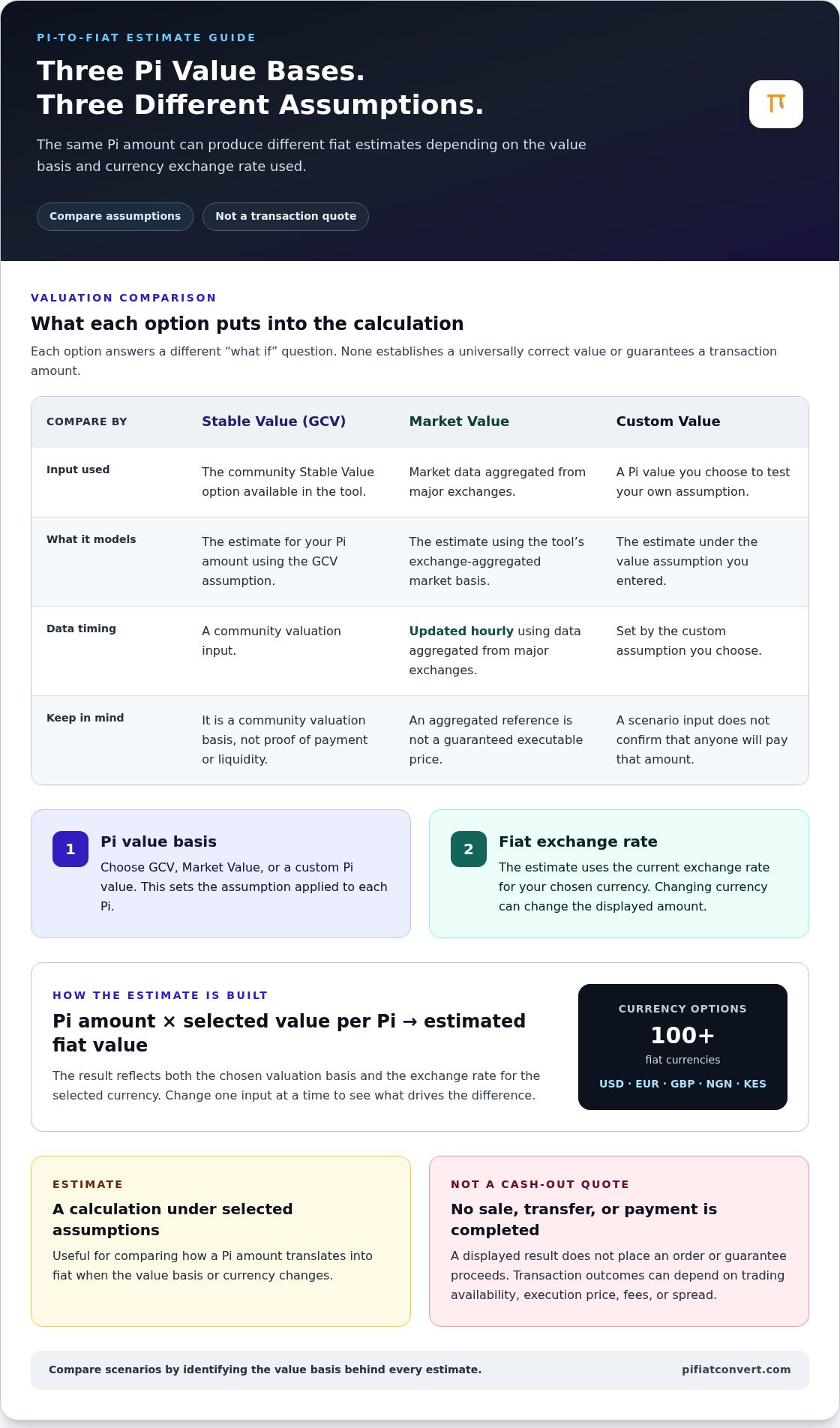
Pi Converter offers three inputs: community Stable Value (GCV), aggregated Market Value, and a custom Pi value. Each gives you a different basis for modeling your amount. They answer different “what if” questions, rather than establishing that a particular price is authoritative or achievable.
Market Value is aggregated from major exchanges and updated hourly. This describes when the market data is refreshed, not a guaranteed executable price. Prices and trading conditions can change between updates, and an aggregated reference doesn’t establish the amount available for a specific transaction. GCV is a community valuation input, while a custom value lets you test an assumption of your choosing. The comparison below explains how to select among these approaches.
How fiat exchange rates affect the displayed amount
Once the selected Pi value is applied, the estimate is expressed in your chosen fiat currency. Pi Converter supports USD, EUR, GBP, NGN, KES, and more than 100 other currencies. Because each currency has its own exchange rate, the displayed amount can vary by currency even when the Pi amount and valuation basis stay the same.
For example, enter a hypothetical Pi amount and view the estimate in USD, then switch the display currency to EUR. The calculator uses the relevant exchange rate for the new currency. If you also switch from Market Value to a custom Pi value, you’ve changed another input, so the estimate may shift again.
To compare scenarios clearly, change one input at a time. Keep the Pi amount fixed while switching value bases, then keep the basis fixed while changing currencies. This helps show what drives the difference instead of making each result look like a competing promise of cash value. You can calculate Pi-to-fiat estimates and compare how the assumptions affect the result.
The valuation option determines what question a Pi-to-fiat estimate answers. Stable Value (GCV), Market Value, and a custom value apply different assumptions to the same Pi amount. Comparing their outputs shows how much the selected basis affects the estimate. None should be treated as a universally correct value or a guaranteed transaction amount.
To interpret a Pi estimate, identify its value basis. Keep track of the option behind each result, especially when comparing figures from different calculators or discussing an estimate with someone else.
| Value option |
Input used |
Question it helps model |
| Stable Value (GCV) |
The community Stable Value option available in the tool |
What would this Pi amount calculate to using the GCV assumption? |
| Market Value |
Market data aggregated from major exchanges and updated hourly |
What estimate results from using the tool’s exchange-aggregated market input? |
| Custom Pi value |
A value entered by the user |
What would the amount calculate to under a particular personal or hypothetical assumption? |
When a community Stable Value estimate is useful
Choose Stable Value (GCV) when you want to calculate using the community Stable Value option. The result shows the arithmetic under that assumption. It doesn’t establish an exchange price, an agreed sale value, or a realizable cash amount. When reviewing a GCV estimate, note the selected basis so you can distinguish it from a Market Value result.
When to use Market Value or a custom Pi value
Market Value is useful when you want an estimate based on the tool’s exchange-aggregated input. Its hourly update schedule provides a defined refresh interval, but it isn’t a continuously executable quote. Market conditions and transaction terms can differ from a calculator reference.
A custom value lets you model a figure you want to test without presenting that assumption as market consensus. For example, use it to compare hypothetical scenarios while keeping the Pi amount and fiat currency unchanged. That makes it easier to isolate the effect of the value input rather than changing several variables at once.
For a practical comparison, calculate the same amount with each option and record the selected basis beside every result. A Pi converter shows how different assumptions produce different fiat estimates. Choose an input based on the question you want to answer, not because one result is automatically authoritative.
How to Use a Pi Converter for a Fiat Estimate
To calculate an indicative fiat value, decide what Pi amount to model, choose a valuation basis, and select a currency. The result reflects those inputs, not one definitive value for every use. For example, enter a hypothetical balance of 25 Pi and compare its estimated equivalent in USD and EUR.
Choose the Pi amount, valuation basis, and fiat currency
Enter the Pi quantity you want to calculate, then select Stable Value (GCV), Market Value, or a custom Pi value. Choose a fiat currency, such as USD, EUR, GBP, NGN, or KES. Set the amount first, then select the value basis and currency, so you can interpret the estimate against the exact inputs used.
- Enter an amount. Use the Pi quantity you want to assess. Keep it consistent when comparing scenarios.
- Select a value basis. Choose GCV, Market Value, or enter a custom value that matches the assumption you want to test.
- Choose a fiat currency. Select the currency in which you want to view the estimate, such as USD or EUR.
- Review the result and its inputs. Note the Pi amount, selected basis, and fiat currency alongside the displayed figure.
Read the estimate with the right context
Read the displayed amount together with its valuation basis. Without that context, the figure can be misleading: the same Pi quantity may produce different estimates under different value inputs. For a useful comparison, change one selection at a time. Hold the amount and currency steady while testing another value basis, or keep the amount and basis fixed while switching currencies.
The result also changes if you enter a different Pi quantity. If you’re checking a fixed balance, make sure the amount matches the quantity you intend to model. Readers looking for examples centered on specific Pi quantities in USD can use the relevant Pi-to-USD reference articles. Those examples provide a fixed-quantity context, while the calculator lets you test your own inputs.
Calculating an estimate doesn’t initiate a trade, withdrawal, or wallet transfer. It displays a fiat equivalent based on your selected inputs. To run a scenario with your own quantity and currency, use the Pi-to-fiat converter, then note the basis so the figure remains interpretable later.
Use Pi Converter to Compare Pi-to-Fiat Scenarios
A useful estimate starts with a clear question: what fiat equivalent results from a particular Pi amount under a specific value assumption? Pi Converter is a free online tool for calculating Pi-to-fiat estimates across more than 100 fiat currencies, including USD, EUR, GBP, NGN, and KES.
The tool helps make assumptions visible and comparable. Hold the amount steady and see how different valuation inputs affect the estimate, rather than treating one result as definitive. The result is informational: it doesn’t represent a completed transaction or guarantee proceeds from a sale.
Compare scenarios without treating them as interchangeable
For a useful comparison, use the same Pi quantity and fiat currency for each calculation, changing only the valuation basis. For instance, calculate one hypothetical balance using Stable Value (GCV), then compare it with Market Value and a custom value. The difference shows how the underlying assumption influences the estimate, not which value will necessarily be realized.
Record the inputs for each scenario: the Pi amount, selected basis, currency, and displayed estimate. This prevents figures from becoming separated from the assumptions that produced them, especially if you revisit the calculations later or compare estimates from different sources.
Currency selection matters, too. A scenario in USD answers a different practical question from one in EUR, GBP, NGN, or KES. If you’re comparing currencies, keep the Pi quantity and value basis fixed. If you’re comparing valuation models, keep the currency fixed. Changing one variable at a time makes the difference easier to understand.
Calculate a Pi-to-fiat estimate with Pi Converter
Enter the Pi amount you want to model, select a value input, and choose from the available fiat currencies. The resulting figure is tied to those choices, so include them whenever you refer to the estimate. This makes the output more useful as a planning reference without overstating what a calculator can establish.
A displayed fiat amount isn’t a trade confirmation, withdrawal instruction, or promise of cash value. Any real transaction is separate from the calculation and depends on external transaction conditions. Pi Converter helps you compare scenarios; it doesn’t execute a transaction.
Ready to test your own amount and assumptions? Open Pi Converter and calculate an estimate.
Make Your Next Pi Estimate More Useful
Treat each calculation as a snapshot of a specific assumption, not a verdict on what your Pi is worth. If you revisit an estimate later, record the inputs so you can compare like with like and understand what changed. This turns a quick calculation into a clearer reference for your own planning.
A Pi converter helps you test a scenario without confusing an estimated fiat equivalent with money received. Use the figure for comparison, not as a promise of proceeds.
Open Pi Converter and calculate an estimate using the amount and assumptions you want to explore. Start with one scenario, then adjust an input to see how it affects the result.
Frequently Asked Questions
Does a Pi converter sell or withdraw Pi?
No. Pi Converter calculates fiat estimates; it isn’t an exchange or brokerage. Entering an amount and viewing a result doesn’t submit an order, transfer Pi, or provide withdrawal proceeds. A displayed USD equivalent is a calculation for reference, not a payment waiting to be collected. Keep the tool’s calculation separate from any transaction you may consider elsewhere.
Is a Pi-to-fiat conversion amount guaranteed?
No. The displayed amount is an estimate based on the selected Pi value and the exchange rate for the chosen fiat currency. It isn’t a guaranteed sale price or a promise of cash received. If a separate transaction takes place, market conditions and transaction-specific terms may affect its outcome. Treat the calculator result as a reference for the inputs shown, not as confirmed proceeds.
Why can a Pi converter show a different amount from an exchange?
A Pi converter and an exchange may use different price sources, update schedules, currency rates, and calculation assumptions. An exchange transaction can also have its own execution conditions and charges, which affect the final amount. Before comparing figures, note the valuation basis and timestamp for each. A calculator estimate and an exchange display may not represent the same price or transaction conditions.
What does PI mean in a Pi-to-USD conversion?
PI is the ticker used for Pi Network Coin, while USD is the currency code for the United States dollar. A Pi-to-USD converter expresses a quantity of the digital asset in a fiat denomination, such as the estimated dollar equivalent under selected inputs. PI is not a fiat currency, and seeing a PI-to-USD result doesn’t mean the asset has been exchanged for dollars.
Does an hourly Market Value update mean the displayed rate is guaranteed live?
No. Pi Converter’s Market Value is aggregated from major exchanges and updated hourly, but that interval doesn’t guarantee an executable quote at every moment. The displayed result is an estimate based on the available data and your selected inputs. If you review a figure later, its update timing and valuation basis help explain why it may differ from another displayed price.
Can I use a Pi converter to estimate value without deciding to sell?
Yes. You can use a Pi converter to model or compare a fiat equivalent without initiating a transaction. Enter an amount and choose a valuation basis to see how that scenario is expressed in your selected currency. The result is informational: it doesn’t require you to treat the figure as an offer, a sale price, or proceeds you’ve received.